You want to run a WordPress site that nobody can connect to your real identity. Maybe you’re a journalist publishing under a pen name, a researcher who needs to share work without professional retaliation, a writer in a country where your topic is dangerous, or just someone who values keeping their hobby separate from their day job. Whatever the reason, you’ve decided to run anonymous WordPress hosting the right way.
Here’s the problem: most “how to be anonymous online” guides cover one layer — they tell you about Tor, or about VPNs, or about WordPress plugins — and then stop. Real anonymity is a stack. Break any single layer and the whole thing falls apart. A perfectly anonymous Tor browser is useless if your domain registrar has your real name in WHOIS. Anonymous Bitcoin payment is useless if you log in from your home WiFi without a VPN. And the cleanest offshore hosting can’t help if your WordPress configuration leaks your IP through XML-RPC, REST API endpoints, or Pingback.
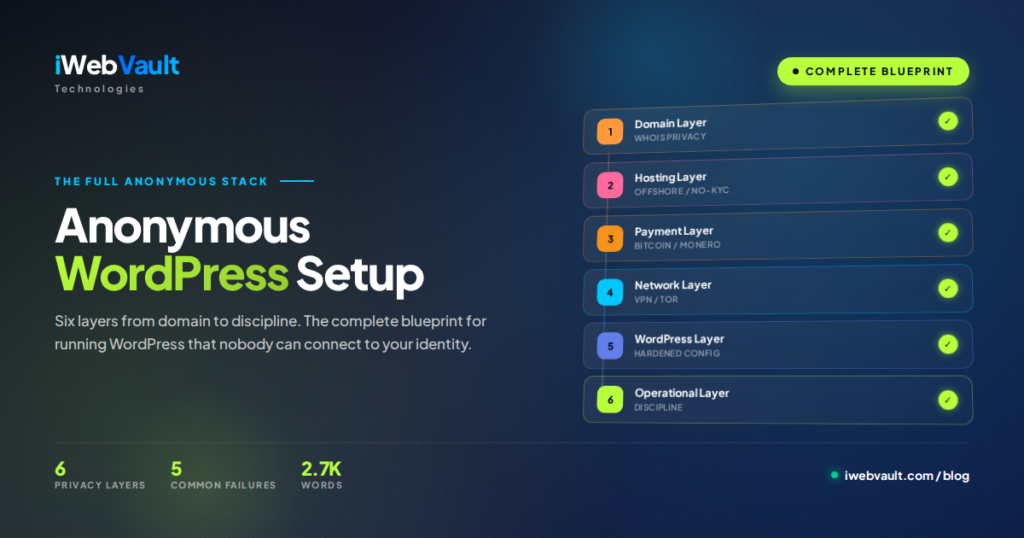
This is the complete blueprint. We’ll cover every layer of the anonymous WordPress stack — domain, hosting, payment, network, WordPress configuration, and operational discipline — with concrete steps you can follow today. By the end you’ll have a WordPress site that’s genuinely anonymous, not just marketing-anonymous.
- Domain layer — anonymous registrar with WHOIS privacy
- Hosting layer — offshore, no-KYC signup, crypto payment
- Payment layer — Bitcoin or Monero from self-custodial wallet
- Network layer — VPN or Tor for every admin session
- WordPress layer — hardened configuration that doesn’t leak metadata
- Operational layer — discipline that prevents accidental identity reveal
This is the synthesis post. If you want detail on any specific layer, our Bitcoin payment guide, WordPress setup guide, and no-log policy explainer go deeper into each.
Why Anonymity Is a Stack, Not a Switch
One layer of anonymity is no anonymity at all. The most common failure mode for self-described “anonymous bloggers” is doing 90% of the work and skipping 10% — and that 10% reveals everything. A few examples we’ve seen:
- Anonymous hosting + real-name domain → public WHOIS shows full name and address
- Anonymous WordPress + Cloudflare → Cloudflare is US-based and complies with court orders
- Tor browsing + signed-in Gmail → Gmail metadata links Tor session to identity
- Bitcoin payment from KYC exchange → exchange has full identity, transaction trail visible
- Anonymous everything + signed-in Facebook pixel on the site → Facebook silently identifies visitors AND admin
Each failure happens because the operator focused on the most visible layer (Tor, hosting, WP plugins) and missed a less-obvious one (DNS, Bitcoin source, third-party scripts). Six layers, six failure points. Real anonymity means closing all six.
Layer 1 — Domain Registration with True WHOIS Privacy
Every domain has a WHOIS record — a public database entry showing who owns it. By default, this includes your full legal name, postal address, phone number, and email. Anyone with a domain query tool can look it up in seconds. WHOIS privacy services hide this from public view by substituting the registrar’s contact information for yours.
The two levels of WHOIS privacy
Not all WHOIS privacy is equal:
- Standard WHOIS privacy — registrar holds your real data internally but doesn’t publish it. Protects against casual lookups. Fails against legal subpoenas (registrar shares your data with authorities on request).
- Proxy registration (true anonymity) — registrar owns the domain on your behalf. Even the registrar’s internal records don’t link to your real identity. Subpoenas return “we don’t know.”
Anonymous registrars in 2026
- iWebVault Domain — included free WHOIS privacy with every domain. Pay in crypto. See our domain service.
- Njalla — pioneer of proxy registration. Most anonymous option but limited TLDs.
- 1984 Hosting (Iceland) — privacy-respecting registrar from a strong jurisdiction.
- EU.org — free third-level domains (
yoursite.eu.org) with no KYC. For projects where the exact TLD doesn’t matter.
Avoid: GoDaddy, Namecheap, and other mainstream US registrars even with “privacy” enabled — they still hold your data internally and routinely share with law enforcement.
Layer 2 — Offshore Hosting with No-KYC Signup
The host is the most visible privacy layer. Done right, it means no real-name attestation, no identity verification, no payment-to-identity linkage. Done wrong, it’s just another KYC funnel disguised in privacy marketing.
What to verify before signing up
- Signup requires only username + email — not full name, address, phone, or ID upload
- Bitcoin (and ideally Monero) accepted directly — not through a KYC-enforcing payment processor
- Offshore jurisdiction with privacy-respecting laws — Netherlands, Bulgaria, Iceland, Switzerland
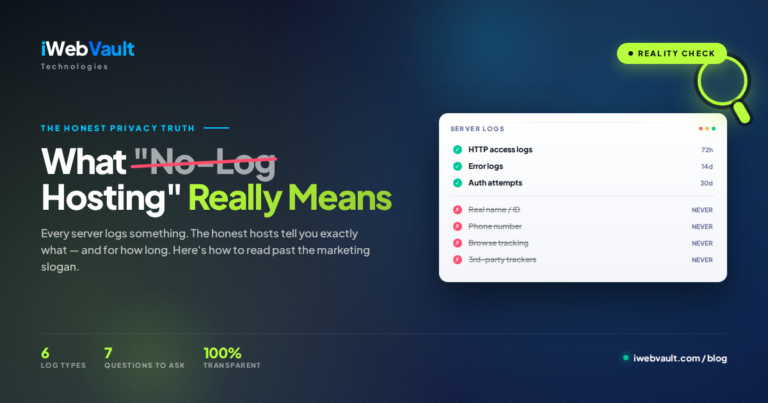
- Published no-log policy with retention specifics — vague claims don’t count, see our no-log explainer
- No third-party trackers on the admin panel — verify with your browser’s developer tools before paying
Our setup
iWebVault accepts signup with just a username and a working email. No name field, no address field, no verification call. Payment via Bitcoin, Monero, Litecoin, or Ethereum from any wallet — no KYC integration. Servers in Netherlands and Bulgaria. cPanel plans from $4/month, VPS from $25/month — both with the same anonymous signup flow.
Layer 3 — Payment Without Leaving a Trail
Buying Bitcoin from Coinbase with your real name and paying iWebVault from that wallet is no privacy at all. Coinbase keeps full records of your purchase, and Bitcoin’s public ledger ties that purchase directly to the payment to us. The chain analysis is trivial.
The clean acquisition path
- Self-custodial wallet first — install Sparrow Wallet, Electrum, or BlueWallet. Generate a fresh seed phrase. Never share it.
- Acquire Bitcoin without KYC — peer-to-peer marketplaces (Bisq, RoboSats, HodlHodl), Bitcoin ATMs in low-KYC jurisdictions, or accept Bitcoin directly from clients who pay in BTC.
- If you only have KYC Bitcoin available — swap to Monero via an instant-exchange service like FixedFloat or SimpleSwap, hold for a few days, swap back to Bitcoin in a fresh wallet. The Monero leg breaks the chain analysis link.
- Send the payment to the hosting provider’s address — from your self-custodial wallet, not from the exchange.
Or skip Bitcoin entirely and pay in Monero
Monero hides sender, receiver, and amount by default. No mixing needed. iWebVault accepts Monero directly. For projects where maximum payment privacy matters, Monero is the cleaner choice — the trade-off is slightly more friction (some users have to acquire it via exchange first), but the privacy guarantee is much stronger.
Full walkthrough of the payment privacy chain is in our Bitcoin hosting guide.
Layer 4 — Network Anonymity for Every Admin Session
Your hosting and domain are anonymous. Your payment is clean. But every time you log into your WordPress admin panel from your home IP address, you create a server log entry tying that IP to your admin actions. If the host’s logs are ever obtained, that’s the link. The fix is to never connect from your real IP.
VPN configuration
For most use cases, a privacy-respecting VPN is sufficient:
- Mullvad — pays cash by mail accepted, no email required, account number is generated randomly. The most operationally anonymous VPN in 2026.
- IVPN — accepts Bitcoin, generated account numbers, clear logging policy.
- ProtonVPN — paid plans accept Bitcoin, but requires email signup. Lower anonymity than Mullvad but still solid.
Pay in Bitcoin or cash. Don’t reuse an account from another purpose. The VPN account should exist only for your anonymous WordPress operations.
Tor for the maximum threat model
If your threat model includes state-level adversaries, use Tor Browser for all admin access. Slower but stronger. WordPress works fine over Tor; you’ll just notice the page loads more slowly.
Browser hygiene
- Use a separate browser profile (or separate browser entirely) for the anonymous account
- Never sign into Google, Microsoft, Facebook, or any identifying service in this browser
- Disable browser sync
- Block third-party cookies aggressively
- Don’t install random extensions — they can track you across sessions
Layer 5 — Hardening WordPress Against Identity Leaks
WordPress out of the box leaks a surprising amount of metadata. Even with all other layers perfect, default WordPress can reveal your timezone, your installed plugins, your hosting environment, your post drafts, and sometimes your real IP. Lock these down:
1. Disable XML-RPC
The legacy XML-RPC interface is rarely needed in 2026 and is a known anonymity leak. Add to your .htaccess:
<Files xmlrpc.php>
  Require all denied
</Files>
2. Disable the REST API user enumeration
By default, WordPress’s REST API at /wp-json/wp/v2/users can list all author usernames. Block public access by adding to your theme’s functions.php:
add_filter('rest_endpoints', function($endpoints) {
  unset($endpoints['/wp/v2/users']);
  unset($endpoints['/wp/v2/users/(?P<id>[\d]+)']);
  return $endpoints;
});
3. Remove WordPress version and generator meta
remove_action('wp_head', 'wp_generator');
add_filter('the_generator', '__return_empty_string');
4. Disable Pingback (prevents IP leaks)
Pingbacks can be used to leak your server’s real IP behind any CDN. Disable in functions.php:
add_filter('xmlrpc_methods', function($methods) {
  unset($methods['pingback.ping']);
  unset($methods['pingback.extensions.getPingbacks']);
  return $methods;
});
5. Don’t use plugins that phone home
Many “free” plugins send anonymous usage data to their developers. Anonymous in aggregate, but combined with other signals, it can deanonymise. Avoid: Jetpack, anything from Automattic, plugins requiring API keys for basic functionality. Audit with browser DevTools → Network tab when logged into admin.
6. No third-party trackers on the public site
Google Analytics, Facebook Pixel, Hotjar — all of these record your visitors AND your admin sessions. If your threat model includes any concern about traffic correlation, don’t use them. Self-host analytics (Matomo, Plausible) or skip analytics entirely.
7. Use a hardened theme
Many WordPress themes load fonts from Google Fonts CDN, scripts from CDNJS, and external resources from CloudFlare. Each of these is a potential identifier leak. Use a theme that loads everything locally, or modify your theme to do so.
Layer 6 — Operational Discipline (The Layer Most People Skip)
All five technical layers can be perfect and you can still doxx yourself in minute three through one habit slip. These are the discipline rules:
Never reuse anything
The anonymous account uses its own username (not your handle from anywhere else), its own email (a fresh privacy-respecting address, not a variant of your real email), its own password (not similar to any password you’ve used elsewhere), its own phone (or no phone). One reused element creates a link.
Never log in from your phone
Mobile phones are identity beacons. Carrier records, location history, persistent advertising IDs. “Just checking quickly from my phone” is the moment most anonymous setups break. Desktop only, through VPN/Tor, in a separate browser profile.
Watch what you write
Writing style is identifying. Linguistic fingerprinting can connect anonymous writing to known writing samples with surprising accuracy. If your threat model includes adversaries who might compare your anonymous writing to your public writing, use a notably different tone — shorter sentences, different vocabulary, even paste-through a translator-then-back for some pieces.
Don’t post identifying photos
EXIF metadata in photos can include GPS coordinates, camera model, and timestamps. Strip metadata before uploading (most image tools have this; exiftool on the command line does it for free). Better: don’t post photos at all unless they’re stock images or generated.
Time-zone discipline
If you always post between 8am and 11pm Lagos time, you’ve revealed your timezone — and probably your country. Either spread your posting times unpredictably (use scheduled posts) or use a time zone for the WordPress site that doesn’t match your real one.
Compartmentalisation
Don’t promote your anonymous site from your real social accounts. Don’t email people from your real email saying “check out my new site.” Don’t tell friends. Each link between the anonymous identity and the real one is a vulnerability — and one casual reveal is enough.
The 5 Most Common Failures (And How to Prevent Them)
1. The “verified” domain leak
Some domain registrars require email or SMS verification “for security.” This creates a verified contact record tied to your domain. Use registrars that don’t verify (Njalla, iWebVault Domain, 1984 Hosting).
2. The CDN identity leak
Putting Cloudflare in front of your anonymous WordPress site protects against DDoS but creates a US-jurisdiction link to your real infrastructure. For privacy-focused projects, use BunnyCDN (Slovenia) or no CDN at all.
3. The Gravatar leak
WordPress sends commenter emails to Gravatar (Automattic, US company) to fetch avatars. Even if you don’t use Gravatar yourself, your commenters’ emails are exposed. Disable Gravatar in Settings → Discussion.
4. The plugin update leak
Every plugin update check sends your site URL to WordPress.org and the plugin developer’s servers. Most can’t be disabled entirely. The mitigation is to use as few plugins as possible — every plugin is a potential surveillance vector.
5. The unique signature leak
An “anonymous” blog with a very specific writing style, posting schedule, niche topic, and writing language easily narrows down to a small number of possible authors. The technical anonymity is fine; the content uniqueness identifies you. Either accept being uniquely identifiable on the content axis, or vary your content patterns to fit a larger crowd.
Frequently Asked Questions
Active work: 2-4 hours including reading. The clock-on-the-wall total is more like 1-2 days because of waiting on DNS propagation, Bitcoin confirmations, and WordPress install. Plan a deliberate afternoon for it rather than trying to squeeze it in around other work — anonymity is a discipline, not a checklist to rush.
In most jurisdictions, yes. Anonymous publishing is a legal right protected by various free-speech traditions. Some authoritarian regimes restrict anonymous publishing — if you’re in one of those, the technical setup is more important and the operational discipline becomes critical. We’re not lawyers; if your jurisdiction is restrictive, consult one familiar with local law.
Yes, with BTCPay Server (self-hosted Bitcoin payments). Stripe, PayPal, and most other processors require business identity verification, which breaks anonymity. BTCPay accepts Bitcoin directly with no third-party — your customers pay you, you get the Bitcoin, no intermediary knows who you are. Setup is more involved than Stripe but well-documented.
That’s why operational discipline matters more than technical setup. Most de-anonymisations don’t happen through hosting forensics — they happen through writing style analysis, accidental social media cross-posting, friends recognising your voice, or one careless login from your home phone. Treat the technical setup as necessary but not sufficient. The discipline is the bigger battle.
Yes — Google indexes hosted content regardless of anonymity. Your anonymity is about the operator behind the site; the site’s content can be fully public and SEO-optimised. Many anonymous blogs rank well in Google.
Yes, but pay attention to the existing traces. Your archived posts may contain identifying details (timestamps, location references, author bylines). Strip them before migration. Your current domain WHOIS history is permanently archived by services like DomainTools — if your old WHOIS showed your real name, that record exists forever. For full anonymity, register a fresh domain rather than migrating an old one.
Depends on your threat model. For most legitimate use cases (journalists, researchers, hobby bloggers), a paid-in-cash VPN like Mullvad is sufficient. For state-level adversaries (whistleblowing, political opposition under authoritarian regimes), Tor is the appropriate choice. Tor is slower but harder to compromise. You can also combine them: Tor over VPN.
Mixing identities. Someone sets up the perfect anonymous stack, then sends one email from their real address to a friend with their new site URL — and the link is permanent. Or they tweet about it from their main Twitter account. Treat the anonymous identity as a completely separate person from day one. Different name, different email, different writing style, different social presence (or none).
Build your anonymous WordPress stack today
iWebVault provides the hosting and domain layers of your anonymous WordPress setup — offshore servers, anonymous registration with username-only signup, Bitcoin/Monero payment, free WHOIS privacy on every domain. Combined with the operational discipline in this guide, you have everything you need to publish anonymously without compromise.
Further Reading
- The Complete Guide to DMCA-Ignored Hosting in 2026 — pillar guide
- Anonymous Hosting That Accepts Bitcoin: Complete Guide — payment layer detail
- DMCA Ignored Hosting for WordPress: Setup Guide — WordPress installation detail
- What Is a No-Log Hosting Policy? — what your host should and shouldn’t log
- Official WordPress Hardening Guide
- EFF: Anonymity Issues